Showing posts with label Windows 8. Show all posts

November 26, 2015

Windows 7-8-10 396 All In One ISO [x86+x64] [Exclusive]


Windows 7-8-10 396 All In One ISO [x86+x64] By adguard
Assembly created on the basis of original images from MSDN. Integrated languages: Russian, Ukrainian, English, German and updates on 12.11.2015 In the builds of Windows 8.1 and Windows 10 enabled Net Framework 3.5 (includes .NET 2.0 and 3.0). The ability to install the Assembly: “Clean installing”, “Install Windows system applications”, “Install activated Windows and Installed activated Windows system applications”.
PreInstalled Features
  • Integrated update-November 12, 2015;
  • Integrated language packs: English, Russian, Ukrainian;
  • Integrated NET Framework 3.5 (includes .NET 2.0 and 3.0);
  • Systems were not in audit mode. All changes made by standard means of Microsoft.
396 All In One ISO’s
Windows 7 SP1 -156in1 :-
-Windows 7 Starter (32-bit) – Russian, Ukrainian, English, German
-Windows 7 Starter N (32-bit) – Russian, Ukrainian, English, German
-Windows 7 Starter E (32-bit) – Russian, Ukrainian, English, German
-Windows 7 Home Basic (32-bit) – Russian, Ukrainian, English, German
-Windows 7 Home Basic (64-bit) – Russian, Ukrainian, English, German
-Windows 7 Home Basic N (32-bit) – Russian, Ukrainian, English, German
-Windows 7 Home Basic N (64-bit) – Russian, Ukrainian, English, German
-Windows 7 Home Basic E (32-bit) – Russian, Ukrainian, English, German
-Windows 7 Home Basic E (64-bit) – Russian, Ukrainian, English, German
-Windows 7 Home Premium (32-bit) – Russian, Ukrainian, English, German
-Windows 7 Home Premium (64-bit) – Russian, Ukrainian, English, German
-Windows 7 Home Premium N (32-bit) – Russian, Ukrainian, English, German
-Windows 7 Home Premium N (64-bit) – Russian, Ukrainian, English, German
-Windows 7 Home Premium E (32-bit) – Russian, Ukrainian, English, German
-Windows 7 Home Premium E (64-bit) – Russian, Ukrainian, English, German
-Windows 7 Professional (32-bit) – Russian, Ukrainian, English, German
-Windows 7 Professional (64-bit) – Russian, Ukrainian, English, German
-Windows 7 Professional N (32-bit) – Russian, Ukrainian, English, German
-Windows 7 Professional N (64-bit) – Russian, Ukrainian, English, German
-Windows 7 Professional E (32-bit) – Russian, Ukrainian, English, German
-Windows 7 Professional E (64-bit) – Russian, Ukrainian, English, German
-Windows 7 Professional VL (32-bit) – Russian, Ukrainian, English, German
-Windows 7 Professional VL (64-bit) – Russian, Ukrainian, English, German
-Windows 7 Professional N VL (32-bit) – Russian, Ukrainian, English, German
-Windows 7 Professional N VL (64-bit) – Russian, Ukrainian, English, German
-Windows 7 Professional E VL (32-bit) – Russian, Ukrainian, English, German
-Windows 7 Professional E VL (64-bit) – Russian, Ukrainian, English, German
-Windows 7 Ultimate (32-bit) – Russian, Ukrainian, English, German
-Windows 7 Ultimate (64-bit) – Russian, Ukrainian, English, German
-Windows 7 Ultimate N (32-bit) – Russian, Ukrainian, English, German
-Windows 7 Ultimate N (64-bit) – Russian, Ukrainian, English, German
-Windows 7 Ultimate E (32-bit) – Russian, Ukrainian, English, German
-Windows 7 Ultimate E (64-bit) – Russian, Ukrainian, English, German
-Windows 7 Enterprise (32-bit) – Russian, Ukrainian, English, German
-Windows 7 Enterprise (64-bit) – Russian, Ukrainian, English, German
-Windows 7 Enterprise N (32-bit) – Russian, Ukrainian, English, German
-Windows 7 Enterprise N (64-bit) – Russian, Ukrainian, English, German
-Windows 7 Enterprise E (32-bit) – Russian, Ukrainian, English, German
-Windows 7 Enterprise E (64-bit) – Russian, Ukrainian, English, German

April 25, 2015

Glass Skin Pack

glass_gui_windows_7


Glass Skin Pack
Glass Skin pack for Windows, will completely change your original Windows to Glass GUI. With all the Software, Desktop Applications and even the Start Up Menu getting a transparent background. Glass GUI is available for Free Download and can be installed very easily.
Transform Windows 8/8.1/7 to Glass
Support:
Windows 8/8.1/7/SP1 [X86_X64] – [All Language] – [All Version]
Credit: swapnil36fg.deviantart.com

April 22, 2015

WinAero WEI Tool : Free Tools To Get Windows Experience Index In Windows 8.1


WinAero-WEI-Tool
It’s a well-known fact that Microsoft has dropped the GUI version Windows Experience Index (WEI) from its latest Windows 8.1 operating system. Windows Experience Index, a feature first introduced with Windows Vista, evaluates and then rates your PC’s hardware.

April 20, 2015

Download Aero Glass For Windows 8.1


Microsoft has dropped Aero glass transparency, start button and start menu features from Windows 8 operating system. Even though according Microsoft, the recently released Windows 8.1 update is largely based on consumer feedback, it has only restored the Start button and users who would like to get other features have no option but to use third-party tools.

While there are over a dozen software out there to disable the Start screen along with all modern features and enable Windows 7-style Start menu, there are only two software available to enable Aero glass feature in Windows 8.
As you probably know, Aero Glass for Windows 8 is the only software out there to enable true Windows 7-style Aero glass in Windows 8. WinAero Glass, the other software designed to enable Aero lets you enable Aero without blur-effect.

Windows 8.1 Boot Screen Logo Changer


We already know it’s possible to change the Windows 8.1 boot screen logo that appears just before the lock screen when you turn on the PC. The method, slightly complicated though, involves editing or replacing the original system files, and require you download a couple of tools to extract system files.
Windows 8.1 Boot Logo Changer Picture5
Even though there are tools and guides to customize the boot screen by disabling the boot logo and the messages, up until today, there was not even a single tool to change the default picture of Windows 8 boot screen with a custom one. Luckily, Victor Alberto Gil, a deviantart member and Windows enthusiast has just released a new tool to easily replace the default boot logo picture with a custom one.
8oot Logo Changer (yes, it’s 8oot Logo Changer) is a free tool designed to change the default boot logo picture of Windows8/8.1 with a custom picture. The tool does the job by replacing the default 6 BMP files packed inside the bootres.dll file located in Resources folder.
Windows 8.1 Boot Logo Changer

Please note that when you change the default boot logo using this tool, you might see Test Mode watermark at the bottom right area of the desktop. The watermark appears because this tool turns on the Test signing mode in order to show the custom boot logo.

For users who don’t like to see the Test Mode watermark, 8oot Logo Changer features a patcher to hide the watermark by editing shell32.dll.mui and basebrd.dll.mui.

Changing Windows 8.1’s boot logo using 8oot Logo Changer is extremely easy. All you need to do is, run the application, switch to the Testmode tab, click Turn on or off button to turn on Test signing, switch back to Bitmaps tab, click the Load Picture button to browse to the picture file and open the same, select the area of the picture that you would like to use as boot logo, click the Arrow button under Edited Pictures section to generate 6 new BMPs, and then click Generate button to generate a new bootres.dll file containing your custom boot logo.
Windows 8.1 Boot Logo Changer Picture3


Before applying the new boot logo, you can preview the new logo by clicking the Preview button located next to the Load Picture button.

April 04, 2015

Windows 8 Font Changer


Easy Ways to Change Font Windows 8

Feeling bored with the font of Windows 8 that's it, but not to change it? Jake will love ya know how to change the font in Windows 8 with ease and which must use the software free and legal.

January 13, 2015

StartIsBack For Windows 8 / Windows 8.1

Genuine start menu

Your faithful desktop friend which helps you:
  • Launch programs you use frequently
  • Open documents you're working on
  • Find stuff you're looking for
  • Go to system places in one click
  • Easily shut down your system
  • Feel at home with Windows 8
StartIsBack fully integrates with Windows 8 and provides original Windows 7 start menu experience, enhanced with many new features as well. Supports all Windows languages!

Less Metro annoyances

StartIsBack will help you to:
  • Disable 'hot screen corners'
  • Show taskbar on Start screen
  • Remove clutter from Start screen
  • Boot to desktop without 8.1
With StartIsBack, it's possible to achieve the balance between two Windows 8 worlds: Metro and Desktop. StartIsBack is optimized to deliver best possible experience on classic PCs, tablets, convertibles and notebooks!

Unique experience

Personalize your system as you want it:
  • Choose a skin for start menu
  • Choose start button appearance
  • Choose shortcuts in Start menu
  • Make Start menu work like XP one
  • Set up hotkeys for Start menu / Start screen / Advanced functions
  • Configure translucency for Start menu and Windows taskbar
Whether you're power user or senior citizen, StartIsBack will work for you. 
http://startisback.com/#download-tab

September 29, 2014

How to remove the Windows shortcut arrow from desktop icons


If you're using Windows 8, you need the latest version, Ultimate Windows Tweaker 3 for Windows 8. The first time you launch it, it will ask if you want to create a restore point. You do.
Once it's up, click Customization in the left pane, then click the File Explorer tab. Click the Remove Shortcut Arrows From Shortcut Icons button. The change happens immediately.
0929 ultimate tweaker win8
 
If you're using Windows 7 or an earlier version, the Club recommends the older  Ultimate Windows Tweaker version 2. Unzip and load the program. Then click Additional Tweaks in the left pane. Check Remove arrows from Shortcut Icons. The changes won't take place until you click Apply, then Close, and then reboot (or at least log off and on).
0929 ultimate tweaker win7
Most programs allow you to click Apply or Close. But this one only works if you do one, and then the other. 
http://www.firedrive.com/file/ED1A5B763F39DBE5

May 14, 2014

New features in Internet Explorer 11 for Windows Phone 8.1

Microsoft recently outlined new features that it added to the Windows Phone 8.1 version of Internet Explorer 11. The company had first announced IE11 for Windows Phone 8.1 at its Build 2014 conference in April, alongside the introduction of Windows Phone 8.1 itself.

Internet Explorer 11 for Windows Phone 8.1

Internet Explorer 11 Windows Phone 8.1 New features in Internet Explorer 11 for Windows Phone 8.1


Everyone always wants a faster browser, which is a fun challenge to work on – and our team breaks this down into two pieces. First, you need to tell the browser where you want to go, and second, the browser needs to get there as fast as possible. The second piece usually gets most of the attention, with browser performance benchmarks (like SunSpider, Acid3, Octane, and other muscular names) driving the discussion. While we have made progress on the benchmarks, a big focus this time was making serious progress on the first piece, telling the browser where you want to go, said Microsoft.
The company has resorted to 2 pronged approach to improve the performance and usability of the browser:
  1. User to let the browser know where he intends to go
  2. Get there as ASAP
For this, IE11 features a new address-bar URL predictions capability. It remembers user’s favourite URLs and shows a possible URL with highlighted part. In short, it has the property of memory. For the second part i.e. browsing, the company maintains it has made progress on the benchmarks (like SunSpider, Acid3, Octane, and others).
Apart from this, there are some significant improvements that become readily visible when you try the rejuvenated browser. Firstly, the IE11 now gets support for unlimited multi-tabbed browsing. Earlier, if you recall, it was limited to just six tabs support. Moreover, the ease of accessing both tab button and refresh button has been taken care of in the update. The button adjacent to the address bar accesses your tabs by default.
One much needed feature that users had anticipated in the IE 11 of Windows 8.1 and has been materialized subsequently is the ability to sync browsing data across phone and other portable devices such as tablet, and PC. This includes passwords, favourites, history, passwords and more.
One of the important characteristics of IE 11 on Windows Phone 8.1 is High Savings Mode, which adroitly downloads only the relevant part of the Web site and heavily compresses images. Users can choose to always enable High Savings Mode or set it to automatic.
Apart from all above, Microsoft claims IE11 has scope for better privacy with SmartScreen Filter and DoNotTrack signal for a protected browsing experience. Internet Explorer’s implementation of file downloads offered little control over the process. Only files which apps can open were supported by the download manager, and surprisingly it lacked option to actually save downloaded files. This has changed with the new update.
Also, for the readers a new Reading View icon can be accessed from the address bar. This helps to clear the clutter and stitch all pages of the article together. Other features that have got a final touch are contrast mode support, Narrator, and an override switch to allow zooming into all Web pages.

January 14, 2014

Immersive Explorer


Immersive Explorer is designed to be an alternative to the default file explorer included in Windows (known as Windows Explorer).
It aims to provide an "immersive" experience to the user by focusing on the content rather than hiding it behind useless icons and large window chrome and borders. It will also avoid the user from having to open different applications and navigate between multiple windows when doing things as simple as viewing a picture.
For example, when the user want to see a photo, instead of opening Windows Photo Viewer in a new window, the photo will be displayed directly in the Immersive Explorer window.
Although it is not a Windows 8 "Metro application", it is designed around the "Metro" user interface guidelines. It will be optimised for touch-screens, but will offer a great experience for desktop users too (with features like scroll-to-zoom, keyboard navigation).
Immersive Explorer is based on Win32/.net/WPF (Windows Presentation Foundation). It uses graphical hardware acceleration to display fluid animations and transitions, making it look more modern than the default GDI-based Windows file explorer. Note that it is not a complete replacement for the Windows Shell (it's just an alternative to Windows Explorer) and it won't even need admin rights to be installed.
As it is not based on WinRT, unfortunately it means that it won't work on Windows RT devices (but it will work on Windows 8 tablets like Surface Pro). I expect Windows 8 (x86) tablets to be more popular than Windows RT tablets among power users, so lack of Windows RT support is not a huge problem. 
Configuration required :
Windows 7 or Windows 8
A Core 2 Duo processor, or better (this app will be optimised to run on low end CPUs like Intel Atom or AMD Fusion in a future version)
At least 1 GB of ram
The .NET Framework 4 must be installed (it is already installed by default in Windows 8, but not on Windows 7).

Start Menu Reviver


It's more intuitive, more functional and more customizable than any other product on the market. Start Menu Reviver is the ONLY solution that is truly touchscreen-friendly and ABSOLUTELY FREE.

So Many More Useful Features                          
Powerful Search 
The search box in Start Menu Reviver is a one stop shop for finding anything on your computer. It will help you find applications, computer settings and documents in a matter of seconds.                    
Make a website Tile 
Start Menu Reviver doesn't just let you add desktop and modern applications as tiles, you can also make tiles to quickly access your favorite websites and even your favorite documents.                          
Access the Start Screen 
If you still want to access the Windows 8 Start screen, you can see it and access it directly in Start Menu Reviver. You can even see how it looked the last time you were there.
Choose your Start Button 
You can easily customize the default Start Button. Start Menu Reviver has many different Start buttons to choose from.


January 10, 2014

Docks


What is Docks?
Docks is the most popular free dock for Windows. It enables you to quickly access and launch your favorite applications, files and shortcuts.

MAIN FEATURES
  • Easily access your shortcuts and frequently used applications
  • Quickly launch and switch between applications
  • Discretionarily re-arrange docks by drag & drop
  • Quickly delete and uninstall the existing docks
  • Quickly search for files and applications
  • Support Windows 8.1, Windows 8, Windows 7, Windows Vista, Windows XP, Windows 2000
“Docks is an animated dock for my Windows 8.1. It enables me to quickly access and launch my favorite applications, files and shortcuts. Very easy to use.”


January 08, 2014

MetroSidebar


The new generation of Windows Sidebar

Live Tiles

These amazing tiles automatically update, each tile works on it's own, so it's like enjoying many applications in one application

Simple Interface
etroSidebar takes advantage of the new Modern UI, so it celebrates a simple and clean user interface that's beautiful to look at and easy to use.

Rooms
One room is not enough to enjoy all the amazing tiles. With MetroSidebar you can group your tiles in many rooms

Top features
Customizable
Make MetroSidebar truly personal by adding, removing, arranging, even grouping tiles in rooms.

Anywhere updates
MetroSidebar can be updated automatically when a new version is available so you can get new features and tiles.

Save time
Quickly get to your favorite tiles by moving your mouse into the top/bottom right corner.

100% free
MetroSidebar is totally free, just download, install and enjoy it!


December 08, 2013

Windows 9 Skin Pack 1.0

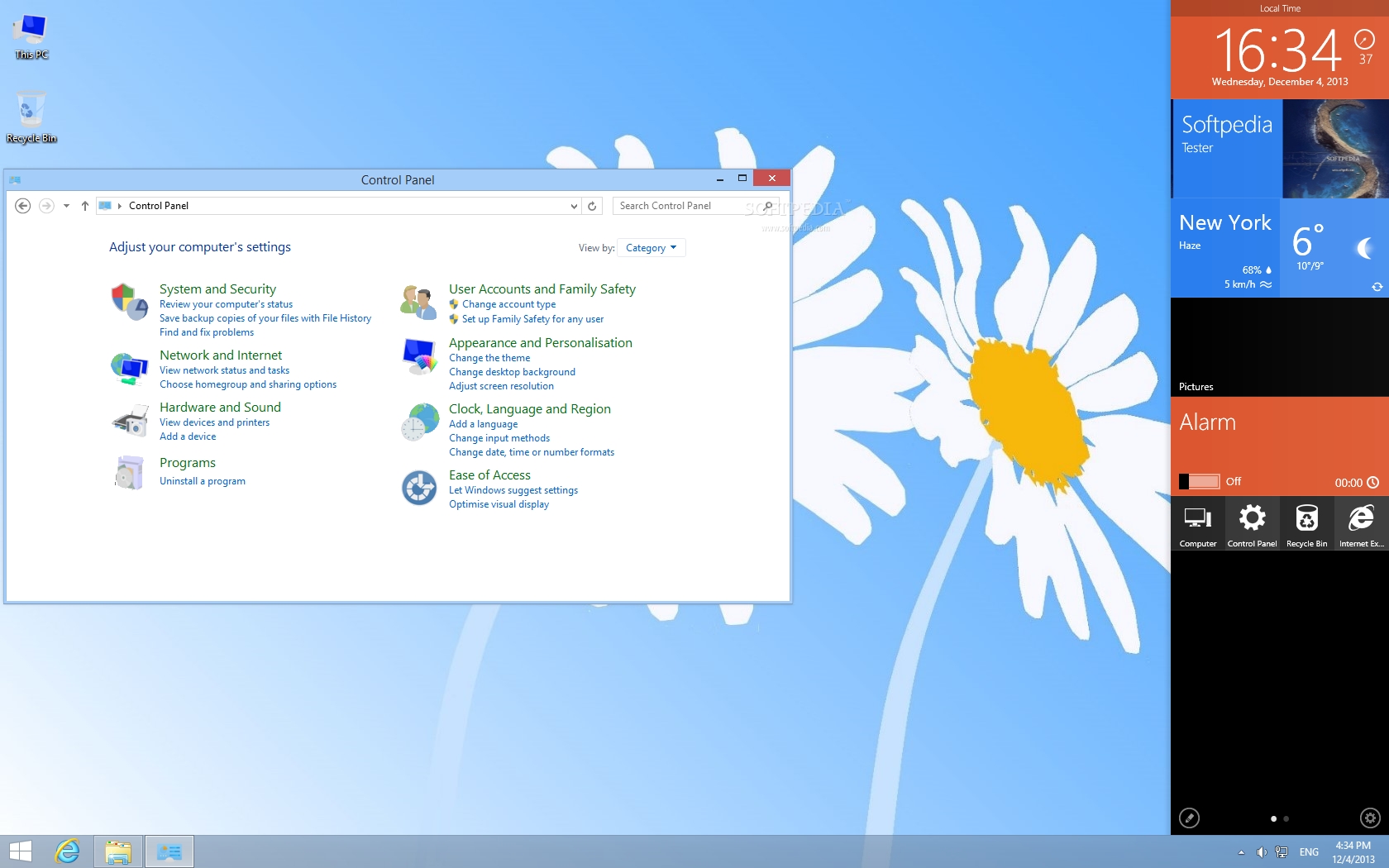
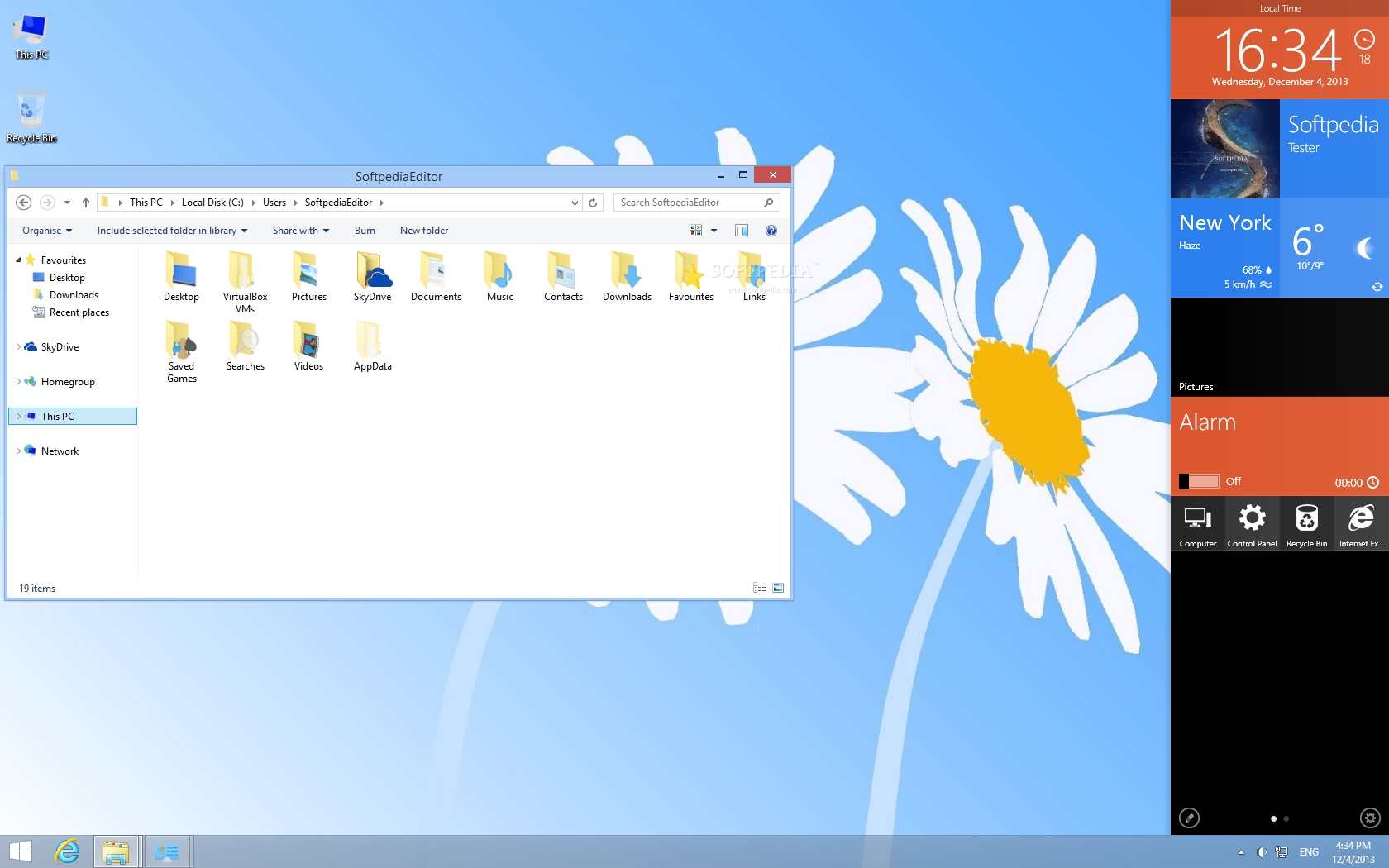
 Windows 9 Skin Pack screenshot 1 - Windows 9 Skin Pack changes the looks of your desktop, providing you with a useful sidebar.
Windows 9 Skin Pack consists of a collection of visual enhancements that targets Windows 7 and 8 users, aiming to provide more appealing looks for the desktop and to deliver a more streamlined and user-oriented experience.
Windows 9 Skin Pack screenshot 3 - Windows 9 Skin Pack includes new icons for the Control Panel as well.
Windows 9 Skin Pack screenshot 2 - Windows 9 Skin Pack provides a new set of icons that will make your experience with Windows more pleasant.


It was designed by the same developer that issued 8 Skin Pack, Lion Skin Pack and the Alienware Skin Pack, as well as other suites that recorded a sky-high popularity as soon as they were released.

Windows 9 Skin Pack targets users who want to enjoy a whole new Windows experience, aiming to draw a general preview of what Windows 9 should bring in terms of appearance.

The developer came up with a modern and imaginative way of putting some visual incentives on display without tampering with the performance of your system.

The package contains all the patches and the prerequisites needed in order to accommodate the new appearance on your computer, thus efforts are minimized to pressing a few ‘Next’ buttons. However, a dose of attention is required for refusing any third-party components that the installer might include.

A system restart is a must in order to be able to get acquainted with the new looks. The thing that will draw most of your attention is the sidebar that sports quick access to the most used computer resources such as weather, alarms, My Computer and so on.

This component is called MetroSidebar and is available as a separate download but the idea to include it in such a package is inspired, since it optimizes the way you interact with your computer a whole lot.

Other enhancements can be identified in the appearance of various icons; sections such as My Pictures, My Documents, My Computer and the Recycle Bin (to name just a few) will be displayed alongside icons that are more colorful and vivid. You will also notice that the collection of built-in cursors has been enriched.

Windows 9 Skin Pack does bring a set of perks that will surely appeal to a lot of users, given the collection of enhancements it offers. All of them are related to appearance, so don’t expect a boost in OS functionality.

Size/ OS : 12.6 MB / Windows 7 / 7 64 bit / 8 / 8 64 bit

http://www.filehippo.com/download_debut_video_capture/download/a2c4ff512e025ebcec7feabb4495156d/


May 04, 2013

Metro Planner 4.2.2012

 
Windows 8 Ready with Metro Planner, touch screen support and you can create multiple appointments for all your family members, even on the same day. View by day, work week, week, month, or time line. Set reminders to alert you of upcoming appointments. Import multiple images for your contacts. View and print your contact list, which includes images for each contact. Manage your household expenses in real time. Enter your deposits, bills, and other expenses watch as the program tracks the balances by running total or by a specific date. See expense pie data, view and print an expense report. Change the look of the program with 40 different themes to choose from. Customize the program by adding categories specific to your personal needs. Comes complete with a full functional help file.Priced right for everyone, download your FREE fully functional trial copy today !
Metro Planner 4.2.2012 Home & Personal software developed by Dunham Developing. The license of this home & personal software is shareware, the price is $17.00, you can free download and get a free trial before you buy a registration or license. Do not use warez version, crack, serial numbers, registration codes, pirate key for this home & personal software Metro Planner. If you want to get a full and unlimited version of Metro Planner, you should buy from original publisher Dunham Developing.
 

April 14, 2013

Microsoft's Windows Blue looks to be named Windows 8.1

Microsoft officials supposedly have decided on the final name for Windows Blue. The final decision, one of my sources told me, is that it will be Windows 8.1.

The client version of Blue, codenamed Windows Blue, is a refresh of Windows 8.
It is expected to be released to manufacturing around August of this year.
As I've blogged a few times, Microsoft is planning to position Blue as part of the Windows 8 wave,
not as Windows 9.
On Twitter this morning Roman L. (a k a @AngelWZR) tweeted a link to a screen shot,
which I've embedded in this post, above, of what appears to be a build of Windows Blue that postdates the one that leaked a week ago. The week-ago leak was build 9364; the new one is 9375. It is labeled in AngelWZR's screen shot as "Windows 8.1 Pro." The original source of this screen shot is Winforum.eu.
"Well, maybe that's not an April Fools' joke," AngelWZR tweeted.
My Blue source said that the top-level branding will be "Windows 8" when Microsoft releases the 8.1 update — similar to the way that Microsoft's Windows Phone officials talked about the "Mango" (Windows Phone 7.5) release as part of the Windows Phone 7 family.
My tipster also says that Microsoft plans to refer to the Blue update for Windows RT as "Windows RT 8.1."
There's no word as to what, if anything, Microsoft plans to charge existing Windows 8 and Windows RT customers for Blue.
Microsoft executives like Windows Chief Financial Officer Tami Reller have said repeatedly that Microsoft envisions Windows 8 as something more than a one-season wonder. Reller has said Microsoft considers Windows 8 a product "of multiple selling seasons." So it makes sense that Blue would be christened Windows 8.x, not Windows 9.
If it pans out that Microsoft has, indeed, opted for Blue to be named 8.1 — rather than 8.5 or 8.7 — I wouldn't be suprised to see the expected next couple of annual Windows client refreshes to also have an 8.X name when they roll out over the next few years.
Microsoft officials are not commenting about Blue, beyond acknowledging that the codename refers to the next wave of products from the company.